Custom Shopify Design or a Stock Theme: When a Custom Store Pays Off
In this article7 sections
Every Shopify store starts with a theme. The real question is how far you take it: launch on a stock theme with your logo and colours, or invest in a custom design built around your products and customers. Both can be the right answer. This article explains when each one makes sense, what custom work actually changes and how to decide without overspending.
Key takeaways
- A stock theme is the right start for a new brand with a small catalogue and a standard buying process.
- Custom design pays off when your brand, products or buying process do not fit the theme's templates.
- On Shopify, "custom" rarely means starting from zero: it usually means custom sections and templates on a solid theme base.
- Judge the investment by the problems it removes: lost sales, app costs and hours spent working around the editor.
What "custom" means on a Shopify store
Shopify themes are built from sections and blocks that you arrange in the theme editor. A stock theme gives you a fixed set of them: a hero banner, a product grid, a testimonials row and so on. You can change colours, fonts and images, but the layout options end where the theme's section library ends.
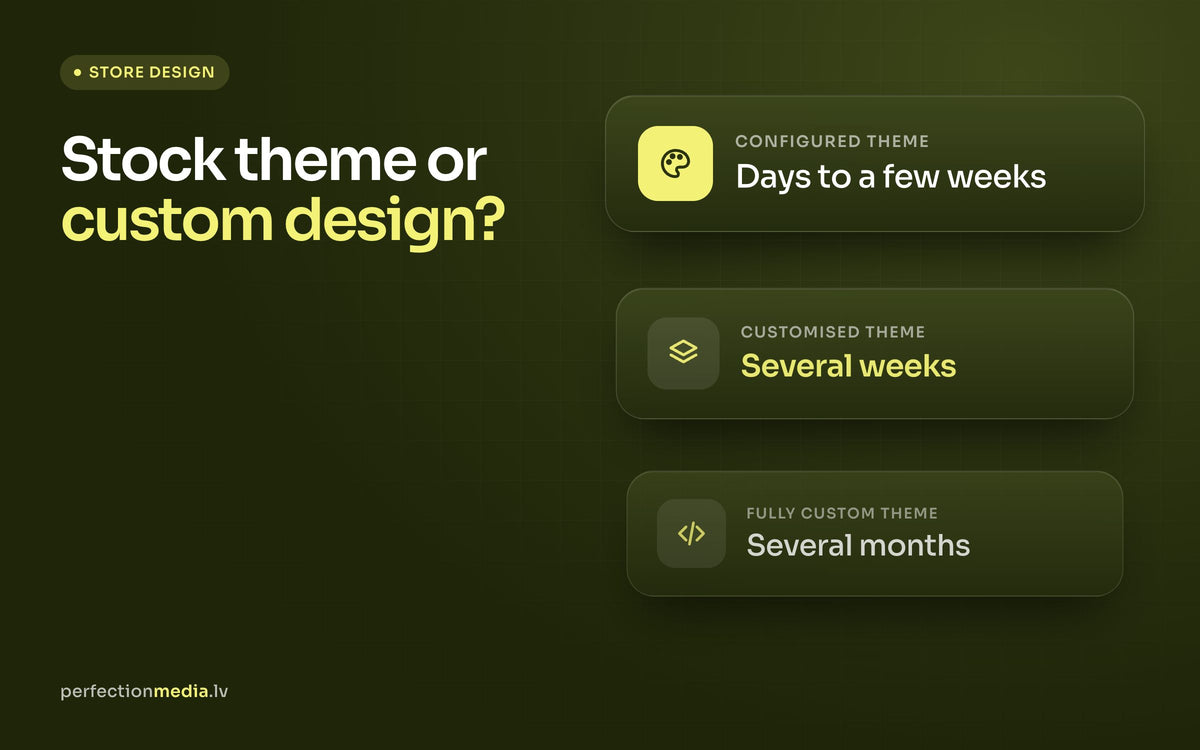
Custom design adds what the theme does not have. In practice there are three levels:
- Configured theme: a stock theme with your branding, content and settings. Fast and affordable.
- Customised theme: a quality theme as the base, plus sections, product templates and design details made for your store.
- Fully custom theme: designed and coded from scratch. Rarely necessary, and only worth it for complex, high-volume stores.
Most stores that outgrow a stock theme need the middle option. It keeps the reliability of a well-maintained theme and adds the parts that make the store yours.

When a stock theme is enough
A stock theme is not a compromise if it fits your situation. It is usually the better choice when:
- you are testing a new product and do not yet know who buys it or why;
- your catalogue is small and the products are easy to understand from a photo and a short description;
- your buying process is standard: choose a variant, add to cart, check out;
- your budget is better spent on stock, photography and the first ads.
In this phase, learning quickly matters more than design. Launch, watch how people use the store and let real data tell you what to build later.
Signs your store has outgrown its theme
Your store looks like hundreds of others
Popular themes are popular for a reason, and that is also the problem. If a visitor cannot tell your store apart from a competitor's within a few seconds, your brand is doing less work than it should. This matters most in categories where people compare several shops before buying.
Your products need more than a photo and a price
Personalised products, bundles, sets with options, technical specifications, size guides and product configurators often do not fit a standard product page. When the information a customer needs is hidden in tabs or missing, they leave or write to you with questions.
The store is held together by apps
Every missing feature solved with another app adds a monthly fee and more code that loads on every page. Ten apps doing small layout jobs can slow the store down and make updates fragile. A single custom section often replaces several apps at once.
You spend hours working around the editor
If a new landing page or a seasonal campaign needs a developer, or you paste HTML into text blocks to get the layout you want, the theme is costing you time every week.
What custom design changes in practice
Good custom work is not decoration. It should solve specific problems you can name before the project starts. Typical results:
- Product pages built for your products: the right information in the right order, with delivery, returns and reviews close to the add-to-cart button.
- Fewer apps, faster pages: features built into the theme instead of loaded from several third-party scripts.
- Sections you can reuse: combine them freely for new pages and campaigns, without calling a developer each time.
- A clear brand: typography, photography and layout that match how you want customers to see you.
- Room for integrations: stock, accounting or warehouse systems connected properly instead of patched in later.

Costs, timelines and upkeep
The table compares the three levels in broad terms. Which column fits you depends on how much the store's design actually affects your sales.
| Level | Configured theme | Customised theme | Fully custom theme |
|---|---|---|---|
| Best for | New brands, small catalogues | Growing brands with specific needs | Complex, high-volume stores |
| Time to launch | Days to a few weeks | Several weeks | Several months |
| Flexibility | Limited to the theme's sections | High | Unlimited |
| Maintenance | Theme updates from its developer | Theme updates plus your custom code | Everything is your responsibility |
For reference, our store builds start from €3,000 excl. VAT, and a new store typically goes live in 4–7 weeks. What different scopes cost is explained on our online store development and pricing page. Whichever route you choose, budget for upkeep as well: themes, apps and integrations need regular updates, which is what our Shopify Care maintenance plans cover, from €149 per month.
How to decide: five questions
- Can you name three specific problems the current theme causes? If not, start with a stock theme.
- Do customers ask questions by email or chat that the product page should already answer?
- How many apps do you pay for only to change how the store looks?
- Is your conversion rate on mobile clearly lower than on desktop?
- Will you run regular campaigns that need their own landing pages?
If most answers point to friction, a customised theme is likely to pay for itself. If you are still testing the product, wait and collect data first. Our complete guide to Shopify store development walks through the whole process, from planning to launch.

How we approach custom Shopify design
Since 2021 we have built more than 200 Shopify stores, and most of them follow the same principle: a solid theme as the foundation, and custom sections only where they change how customers buy. We start with your products, your customers and your current data, then design page by page before any code is written. You can see the results in our client examples.